Showing posts with label review. Show all posts
Showing posts with label review. Show all posts
Friday, May 25, 2018
Book Review: Mid-Century Modern Furniture: Shop Drawings & Techniques for Making 29 Projects by Michael Crow


Wednesday, January 11, 2017
Building the Perfect Tool Chest by Jim Stack [book review]
Building the Perfect Tool Chest by Jim Stack
 Let me start by saying I love this book. I first found it in our
 local library and after renewing it three times decided to own it. In a nutshell it is fifteen tool box plans. Not the fancy shmancy quilted mahogany with ivory inlay type of boxes, or the kind where the tools are stacked eight levels deep, or the faddish type that are all the rage in magazines, but the kind of tool holders that most of us would use day to day.
There is considerable variety from a simple box with lid, large tool chests, open tool tote, chest of drawers, a hanging cabinet, and even a box for fisherman. For each tool box there is a detailed materials list in both inches and metric, lots of photos and illustrations, and helpful tips on joinery and assembly. Many of the boxes are built with plywood or pine but you can substitute any material. Joinery varies a bit from box to box.
There are fifteen projects and fifteen sections or chapters, plus a short introduction, a list of suppliers, and an index. This book assumes you have the basic knowledge and skills to complete the projects. It is not teaching woodworking, it is sharing ideas. So many times I've been disappointed because the cover has a couple nice projects but half the book is how to use a screwdriver and where to buy router bits. This book is fluff free and in my opinion all the toolboxes look useful and are logically constructed.
If you wish to buy Building the Perfect Tool Chest, you can click the cover picture above to find it on Amazon.
Table of Contents

Thursday, April 16, 2015
Review: iGaging IP54 Digital Caliper

Of course I set out to measure all sorts of things that needed measuring like the scrap of brown paper in the case, various doodads and whizzbangs lying around. Precision was excellent. I tried measuring with the full length of the jaws then just the tips and each time the measurement was within 0.0005". Then I checked it against the only semi accurate things I own, drill bits. All my 1/4" drill bits were undersize and within 0.001" of each other, either 0.247" or 0.248". What does that mean? Nothing I suppose. I lack any set up blocks or anything made to a high degree of accuracy. Printer paper is supposed to be 0.004" and this agreed, that's the best I can do. My needs are modest, I'm not a machinist, so I'm sure these are plenty accurate for my purposes. The caliper itself felt well made, has good weight and no obvious defects. The thumb wheel moves freely. The display is large and numbers are easy to read under fluorescent lighting. Overall I am very happy with these. During the last few weeks I keep finding uses for this in my woodshop. It has become something I use on every project.
Monday, April 13, 2015
Review: AccuRemote Digital Inclinometer

The inclinometer was easy to use, I didn't bother with instructions. I spent awhile measuring angles everywhere then going around checking the machines in my shop. I tried testing for accuracy the same way you would test a level, by flipping it 180 degrees, but got inconsistent results. According to this, after setting my table saw blade with an engineer square, I was 0.20 of a degree out. So pretty close but if this thing is accurate then it's nice to get that extra precision especially when cutting miters or segments for turning. My miter saw was dead on perpendicular, as I believed. My band saw was off .5 degree which I already suspected.

It turned out, the case is not square to the bottom on all sides. So if you zero the device then turn it on it's side, it should read 90 degrees. The left side read 90 degrees, the right side read 89.70 degrees. Since I have a right tilt saw and would be using the bottom and right sides most often, being off by .30 degrees would just be annoying. I was also bothered that rotating the device 180 degrees does not give the same or reciprocal reading. And I had issues with precision (repeatability) when the daytime temperature was under 60 degrees Fahrenheit. So I sent the inclinometer back to Amazon. Based on the many reviews of this and similar products like the Wixey, I believe it is luck of the draw whether you get an instrument that is accurate and precise. So I wouldn't say iGaging makes poor instruments, just that digital inclinometers in this price range suffer poor quality control. The summary is I can not recommend for or against the product.
Tuesday, December 16, 2014
Stanley 501A Try Square, a vintage tool review + Before and After
These ugly try squares were a bargain price I couldn't refuse, less than $2 each. I didn't buy them as show pieces but to scatter around the shop so I would have a square handy where needed.
The Bad:
A previous owner had spilled some kind of glue all over the blades and left it. Rust formed under the glue but luckily was only on the surface. A quick scraping, a vigorous brushing for good measure and they were clean and rust free although stained. They had been dropped numerous times and all the metal corners were bent but a file put it right in a jiffy. The previous owner also painted the handles green, probably to identify them at a glance. Through all that abuse the squares stayed true so I have to give my nod of approval.
 |
| Before |
The order is reversed in the bottom pic. Middle is still middle but top and bottom squares are reversed. (Reminds me of this Johnny Cash song)
 |
| After |
The Bad:
- Numbers have no contrast and are tough to read.
- Handles are plastic and balance is poor, they are blade heavy.
- Blades are stamped steel.
The Good:
- They are dead nuts square, at least to my ability to measure. I compared them against a machinist square and did the 'ol draw a line and flip test - square.
- They are fairly durable as you will read below. These took some abuse and stayed square.
- Made in U.S.A.
A previous owner had spilled some kind of glue all over the blades and left it. Rust formed under the glue but luckily was only on the surface. A quick scraping, a vigorous brushing for good measure and they were clean and rust free although stained. They had been dropped numerous times and all the metal corners were bent but a file put it right in a jiffy. The previous owner also painted the handles green, probably to identify them at a glance. Through all that abuse the squares stayed true so I have to give my nod of approval.
Sunday, December 7, 2014
Twelve-in-One Combination Tool, a vintage tool review.
Thought it might be fun to review vintage tools that are still commonly available. First up we have the Twelve-in-One patented in 1927 by Thomas Setzer Hutchison, a very interesting man in his own right but we will get to that later.

The Twelve in One combination tool is made of German silver, is approximately 12" long when fully extended, and was advertised to perform the following functions:
Does it? Well yes although some of the functions overlap. Hutchison's invention has two sets of grooves so that mating rulers can be locked at 90°, in the middle as a t-square or on the end as a try square. I measured these angles with an engineer square and also with the line drawing technique and found them dead nuts square. Setting the gauge for 30/45/60 degrees involves aligning one arm to lines scribed in the other, this is less precise than grooves but when checked against drafting triangles I found the markings to be accurate.
 Is the Twelve in One tool worth owning? Yes. It is a lightweight, very compact tool that fits nicely in your pocket. The angles are accurate and it performs all its functions well considering it is simply two pieces of metal and a thumbscrew. I use it most often as a depth gauge, square, and bevel gauge; in that order. The lines are a little hard to see on mine for use as a ruler but it's passable in a pinch. I've yet to use it as a compass because I always forget but it does work well as a marking gauge. The thumbscrew is easier to tighten than loosen, whether that is a benefit or detriment I'll leave to the individual. I wouldn't mind if the thumbscrew were just a tad taller, maybe 1/32". These can be found on ebay under various titles. Many sellers have no idea what they are and may be listed as combination tools, 12 in 1, twelve in one, Nashville tool, dozen tools in one, and other variations. At least one other company manufactured them, a CWS Co. based in Chicago.
The Twelve in One combination tool is made of German silver, is approximately 12" long when fully extended, and was advertised to perform the following functions:
 |
| 1934 Advertisement |
- 12" Ruler
- T-square
- Bevel gauge
- Depth gauge
- Try square
- Marking gauge
- Inside measure
- Compass
- 30° angle
- 45° angle
- 60° angle
- Adjustable extension ruler
Does it? Well yes although some of the functions overlap. Hutchison's invention has two sets of grooves so that mating rulers can be locked at 90°, in the middle as a t-square or on the end as a try square. I measured these angles with an engineer square and also with the line drawing technique and found them dead nuts square. Setting the gauge for 30/45/60 degrees involves aligning one arm to lines scribed in the other, this is less precise than grooves but when checked against drafting triangles I found the markings to be accurate.
Is the Twelve in One tool worth owning? Yes. It is a lightweight, very compact tool that fits nicely in your pocket. The angles are accurate and it performs all its functions well considering it is simply two pieces of metal and a thumbscrew. I use it most often as a depth gauge, square, and bevel gauge; in that order. The lines are a little hard to see on mine for use as a ruler but it's passable in a pinch. I've yet to use it as a compass because I always forget but it does work well as a marking gauge. The thumbscrew is easier to tighten than loosen, whether that is a benefit or detriment I'll leave to the individual. I wouldn't mind if the thumbscrew were just a tad taller, maybe 1/32". These can be found on ebay under various titles. Many sellers have no idea what they are and may be listed as combination tools, 12 in 1, twelve in one, Nashville tool, dozen tools in one, and other variations. At least one other company manufactured them, a CWS Co. based in Chicago.
About Thomas Hutchison, he was a lifelong soldier who rose through the enlisted ranks and eventually commissioned as an officer. He served with distinction in the Spanish American War and retired a captain. After the war he served as police commissioner fighting for reforms in animal cruelty and child care. Apparently life in Nashville was too tame and he volunteered for the Greek Army and fought in the First Balkan War. After finally retiring he invented this combination tool. Hutchison died in 1936.
Tuesday, November 25, 2014
Woodwork Visualized: shop class in a book. [book review]

[TLDR version: fledgling woodworkers should get a copy of this book or read it online for free.]
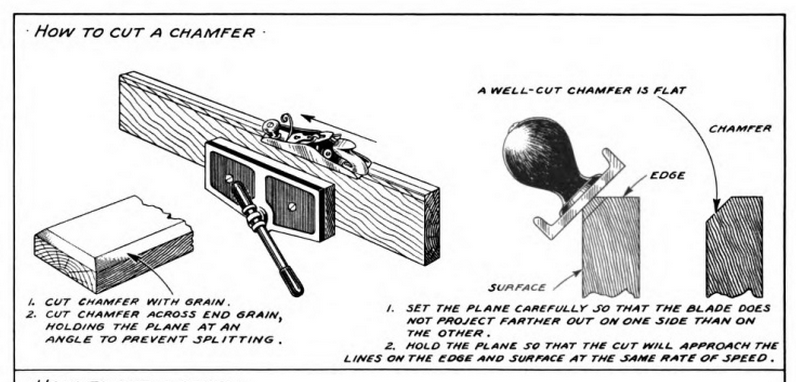
Ever wanted to predict which way a stick of lumber will warp? Curious why heartwood is more stable than sapwood? Cramlet crams much useful information about how trees grow, why and how lumber warps, how timber is cut into boards, how to measure board feet, and tips on selecting the strongest wood for handles (use fast grown, straight grain, wood); all in just four pages packed with pictures.
- How to lay out common shapes with a compass.
- Transferring designs with graph paper.
- Setting up, tuning, and using hand planes.
- Basic chisel cuts.
- Filing. Rasping. Shaping. Sawing.
- Several sections on wood joinery, marking, cutting, and fastening.
- Sharpening. You know we woodworkers like to obsess about that.
- And basic finishing.

There are a few projects at the end. Beginning with a simple box and working up to a saw bench, wall cabinet, workbench, tool box, and basic furniture. Projects may vary by edition.
Sunday, May 25, 2014
Shopping Video Editing Software [reviews]
Been dabbling in video editing as you can tell from my posts. I am one to research a decision like a software purchase as if my life depended on it so I decided to share my thoughts and if you have experiences with any of these programs feel free to leave a comment.
Premiere 2.0: good but outdated, no HD video, new version is too expensive
VideoPad trial ($40 to buy): I liked it but feel it’s expensive for what it is. There is a free version that perhaps has a few more features than MSMM.
MSMM Microsoft Movie Maker ($free): Simple to use, intuitive, not compatible with 3gp files (my phone). Basically this works if all you want to do is string video clips or photos together with no audio or visual tweaks.
Corel Video Studio Pro X7 ($65): Beautiful modern interface, very intuitive, loads of extras (transitions, effects, etc). Auto correct settings for light levels, colors, etc.; the default settings aren't always ideal but it is easier to get them close with auto correct and tweak them than start from scratch each time like Sony. For whatever reason, Corel defaults to not asking if you want to match the project settings to the source and this initially caused some audio editing issues but after turning the setting to on the problems went away. [edit: the following bug is fixed in an update] One aggravating issue is that Corel will crash when importing certain file types like MP4 and 3GP unless you rename them with a MOV extension. It's a really stupid issue that someone in QC should have caught. 3GP I can understand as it's less common but MP4? That's just inexcusable. Both file types import fine once you rename them. There is an Ultimate version which is only a few extra bucks and has a few more effects. [edit: I bought the Ultimate version for the same price as Pro. Keep an eye on Amazon as the price of Ultimate can fluctuate by up to $30 daily]
Sony Movie Studio 13 ($30): Interface is bland and Win98-ish, bare bones editing software. A very minor step up from MSMM. Might was well use the free version of VideoPad.
Sony Movie Studio 13 Platinum ($80): Same as above but with a few more features and extras. Compared to Corel the interface is slightly clumsy but easy enough to use. Lacks auto correct functions for audio and visuals which can be tedious. Fewer extras than Corel, which may not seem like a big deal until you spend an hour making a frame, intro, etc. Buttons are childishly large even in the advanced setting and color scheme choices are white (terrible) and a medium grey. Blandness McBlandybland. However it is rock stable. Sony's best feature is that you can edit on the fly without stopping the video and there is no lag between pressing play and the video starting.
Cyberlink Power Director 12 ($62): Kind of a middle ground, good interface, powerful, very resource hungry. Uses 2X the memory of Sony MS even with no project open and uses 30% of CPU most of the time. Only one of the bunch that slows my computer. The interface is like a slightly improved version of Sony MSP. Unfortunately it was very crash prone. I would like to have tested this more but it's resource requirements and instability make it very frustrating.
Pinnacle Studio 17 ($83): Decided not to install it. Recent reviews talk of a lengthy and very difficult installation process that takes hours; and reviews of the newer versions were not very favorable.
Jahshaka (open source), Blender (open source); both way above my paygrade.
Jahshaka (open source), Blender (open source); both way above my paygrade.
Subscribe to:
Posts (Atom)